Joomla User Manual
Category List Override
The List of Contacts in a Category
The default layout of contacts in a category is controlled by a template in the com_contacts component code. The default layout looks like this:
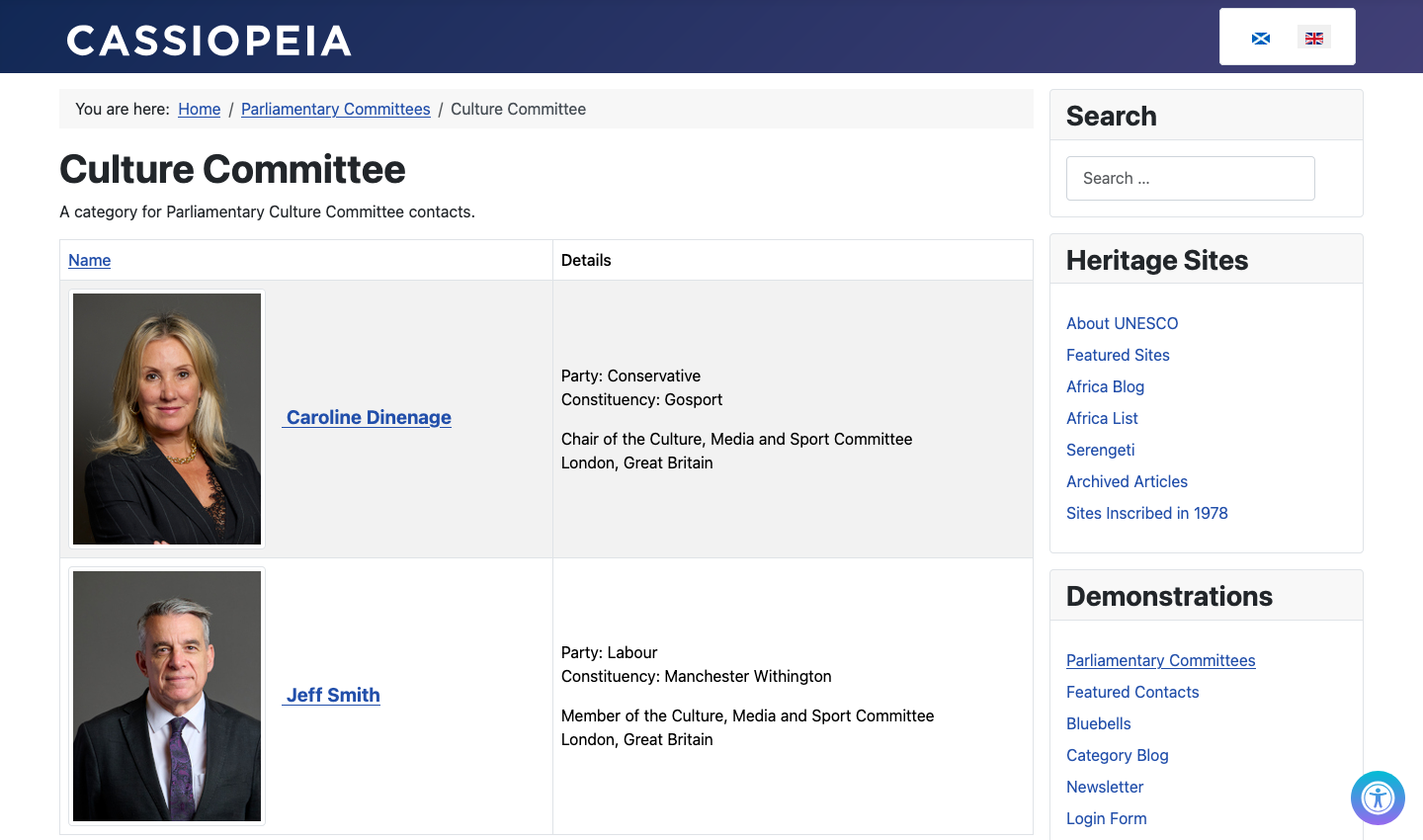
It may be a personal opinion, but for me the default contact layout is not quite satisfactory. My problems:
- The original portrait images were 500 pixels wide and much too dominant.
- The contact name is not sufficiently emphasised.
- The personal details bullet list has no heading and looks isolated.
- The individual's role has no heading.
- The address and post code fields are absent
- The location data is incomplete.
- The data for each contact are laid out in a table and rather cramped on narrow screens.
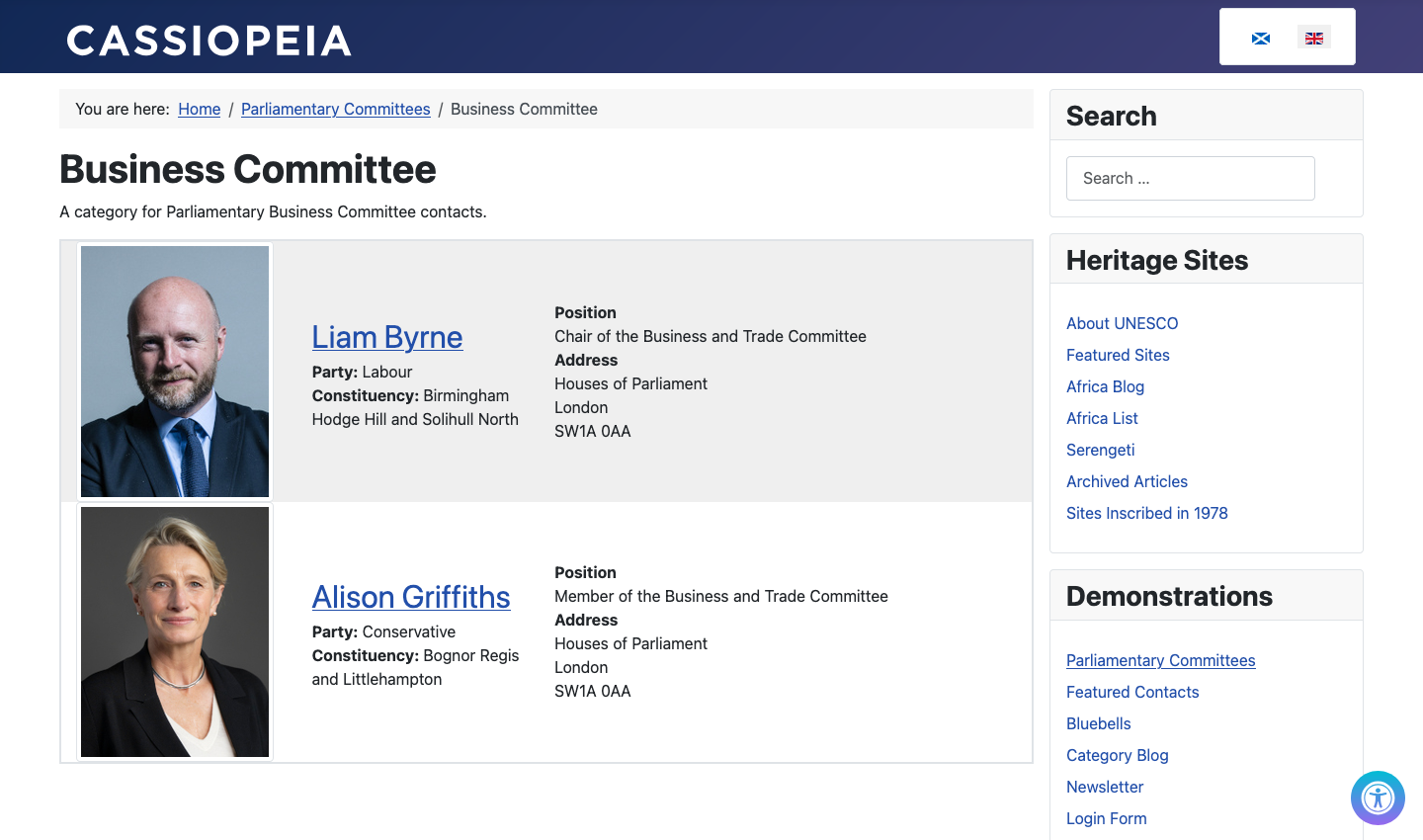
So how to fix it to my liking? My solution is to create a template override and add some custom styles. Here is the result:
Template Layout Override
The com_contact/tmpl/category folder has three PHP files: default.php, default_children.php and default_items.php. The last in this list contains the table layout for the list.
The override files are created via System / Site Templates / Cassiopeia Details and Files / Create Overrides. Select com_contact and then category. The html folder then contains com_contact/category with the three template files mentioned above.
Change the default.php file to mydefault.php
The default.php file contains a line that specifies which layout to use for
each individual record. Select this file for editing and rename it to
mydefault.php (or use any prefix you like instead of my). Do not use an
underscore in the filename!
When you later go to the Contacts / Category / Edit form, the Options tab Layout field lets you choose between the component layout and your override layout. It looks like this:
---From Global Options---
  Use Global
---From Component---
  Default
---From cassiopeia Template---
  mydefault
Edit the mydefault.php file
Line 20 of mydefault.php contains $this->subtemplatename = 'items';.
Change items to myitems so lines 18 to 23 are as follows:
<div class="com-contact-category">
    <?php
        $this->subtemplatename = 'myitems';
        echo LayoutHelper::render('joomla.content.category_default', $this);
    ?>
</div>
Change the default_items.php file to mydefault_myitems.php
The default_items.php file contains the layout for each contact. It needs to
be renamed to preserve the option to use the original layout. The first part
of the name is unimportant. It is the myitems part referred to in the
mydefault.php file that is used for the layout.
Edit the mydefault_myitems.php file
The <table>...</table> section of this file spans lines 85 to 204. For the
layout override I replaced the table markup with the following Bootstrap grid
markup. On narrow screens the three columns are stacked. On screens wider than
768 pixels the columns are side by side. The revised markup has moved the
custom fields to beneath the contact name.
<div class="container-fluid text-center border border-2">
<?php $nrows = 0; foreach ($this->items as $i => $item) : ?>
    <?php if ($item->published !== 1 ||
        (!empty($item->publish_up) && strtotime($item->publish_up) > strtotime(Factory::getDate())) ||
        (!empty($item->publish_down) && strtotime($item->publish_down) < strtotime(Factory::getDate()))) { continue; } ?>
        <div class="row cat-list-row<?php echo $nrows % 2; $nrows += 1; ?> align-items-center">
            <div class="col-12 col-md-3">
                <?php if ($this->params->get('show_image_heading')) : ?>
                    <?php if ($item->image) : ?>
                        <?php echo LayoutHelper::render(
                            'joomla.html.image',
                            [
                                'src'   => $item->image,
                                'alt'   => 'official image of ' . $item->name,
                                'class' => 'contact-thumbnail img-thumbnail',
                            ]
                        ); ?>
                    <?php endif; ?>
                <?php endif; ?>
            </div>
            <div class="col-12 col-md-3">
                <div class="parliament-committee-fields">
                <a href="<?php echo Route::_(RouteHelper::getContactRoute($item->slug, $item->catid, $item->language)); ?>">
                    <span class="fs-2"><?php echo $this->escape($item->name); ?></span>
                </a>
                    <?php echo $item->event->beforeDisplayContent; ?>
                </div>
            </div>
            <div class="col-12 col-md-6 text-start">
                <?php if ($this->params->get('show_position_headings') && !empty($item->con_position)) : ?>
                    <strong><?php echo Text::_('COM_CONTACT_FIELD_INFORMATION_POSITION_LABEL'); ?></strong><br>
                    <?php echo $item->con_position; ?><br>
                <?php endif; ?>
                <?php if ($this->params->get('show_suburb_headings')) : ?>
                    <?php $location = []; ?>
                    <?php if (!empty($item->address)) : ?>
                        <?php $location[] = $item->address; ?>
                    <?php endif; ?>
                    <?php if (!empty($item->suburb)) : ?>
                        <?php $location[] = $item->suburb; ?>
                    <?php endif; ?>
                    <?php if (!empty($item->state)) : ?>
                        <?php $location[] = $item->state; ?>
                    <?php endif; ?>
                    <?php if (!empty($item->postcode)) : ?>
                        <?php $location[] = $item->postcode; ?>
                    <?php endif; ?>
                        <strong><?php echo Text::_('COM_CONTACT_FIELD_INFORMATION_ADDRESS_LABEL'); ?></strong><br>
                    <?php echo implode("<br>\n", $location); ?><br>
                <?php endif; ?>
                <?php if (!empty($item->misc)) : ?>
                    <?php echo $item->misc; ?>
                <?php endif; ?>
            </div>
        </div>
    <?php endforeach; ?>
</div>
Styling
Bootstrap style classes can be defined in the mydefault_myitems.php file.
For example, <span class="fs-2">...</span> is used to increase the font size
of the contact name. Other styles can be added in the user.css file, for
example, customisation of bullet lists only appearing within a tag that has a
class of contactList.
Here are the styles entered in the user.css file to obtain the layout of the Business Committee illustrated above.
.contact-thumbnail {
  max-width: 200px;
  margin-right: 1rem;
}
a:has(.contact-thumbnail) {
  font-weight: 700;
  font-size: larger;
}
#contactList ul {
  list-style-type: none;
  padding-left: 0;
}
.cat-list-row0 {
  background-color: #efefef;
}
.cat-list-row0:hover, .cat-list-row1:hover  {
  background-color: #ddd;
}
div.parliament-committee-fields {
  text-align: left;
  margin-top: 1rem;
}
div.parliament-committee-fields ul.fields-container {
  list-style-type: none;
  padding-left: 0;
}
div.parliament-committee-fields ul.fields-container span.field-label {
  font-weight: 700;
}