Joomla User Manual
Keep Submenus Open
A menu module can be used to display a horizontal menu (usually at the top of the page) or a vertical menu (usually in a sidebar, left or right). In a horizontal (top) menu it is not desirable to keep the submenu open. That is why the default behaviour of a menu module is to close the submenus on page load.
Toggle status open behavior
However, in a vertical (sidebar) menu, it is often desirable to leave a submenu open when it contains the active menu item. In Joomla 6.0 a new CSS class, nav-active-open, was introduced specifically to allow control over whether submenus are automatically opened on page load for the active menu item. Setting this class now makes it possible to achieve this. The class is set in the module via the backend.
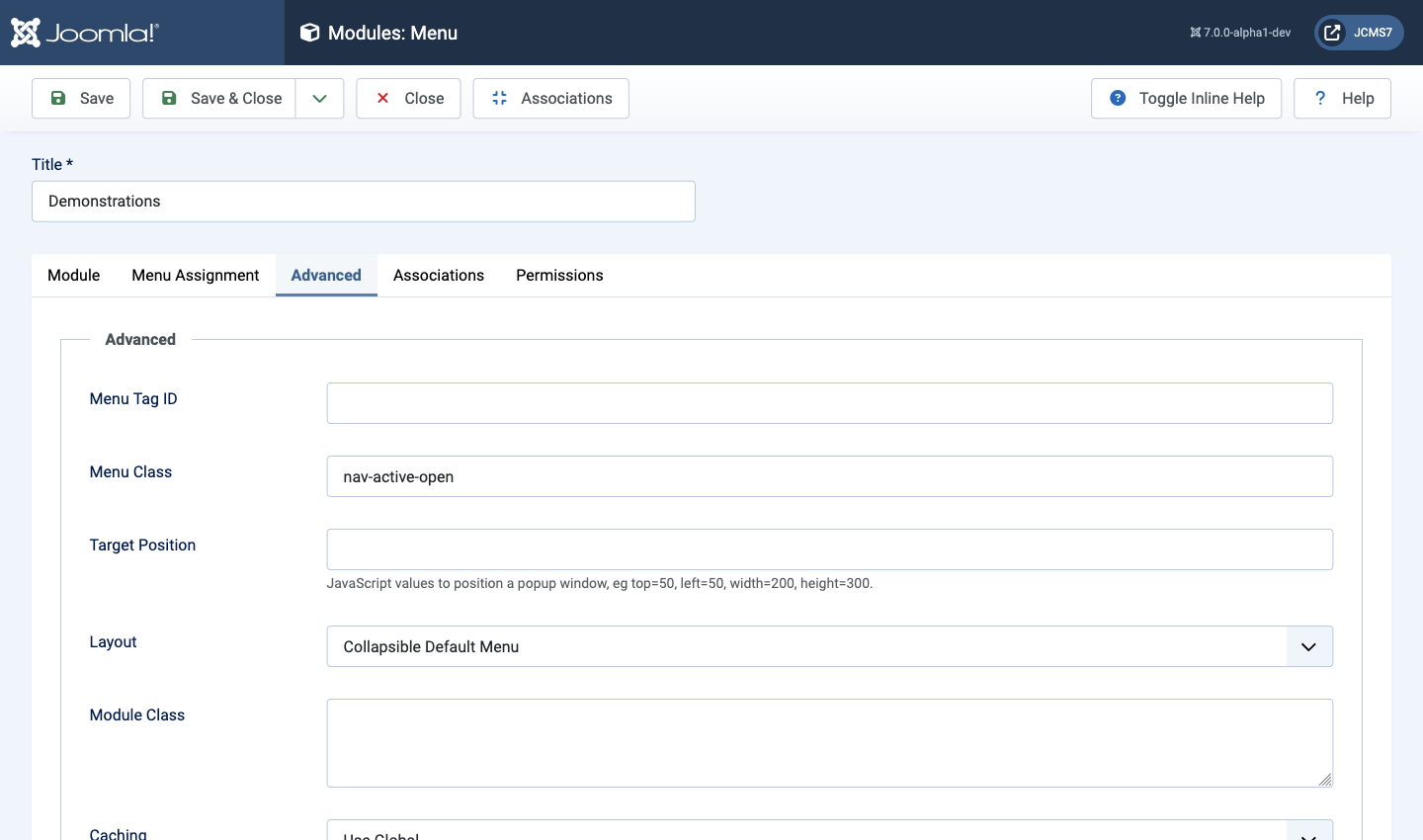
How to make a sidebar menu without dropdown toggle
If you want to keep all submenus open, you don't need a dropdown toggle. Instead, use a template override.
This is how this particular template override is accomplished:
-
Start by selecting System → Templates → Site Templates in the Administrator menu and then select the Cassiopeia Details and Files item. That will open the Templates: Customise (Cassiopeia) form.
-
Switch to the Create Overrides tab and and select mod_menu:
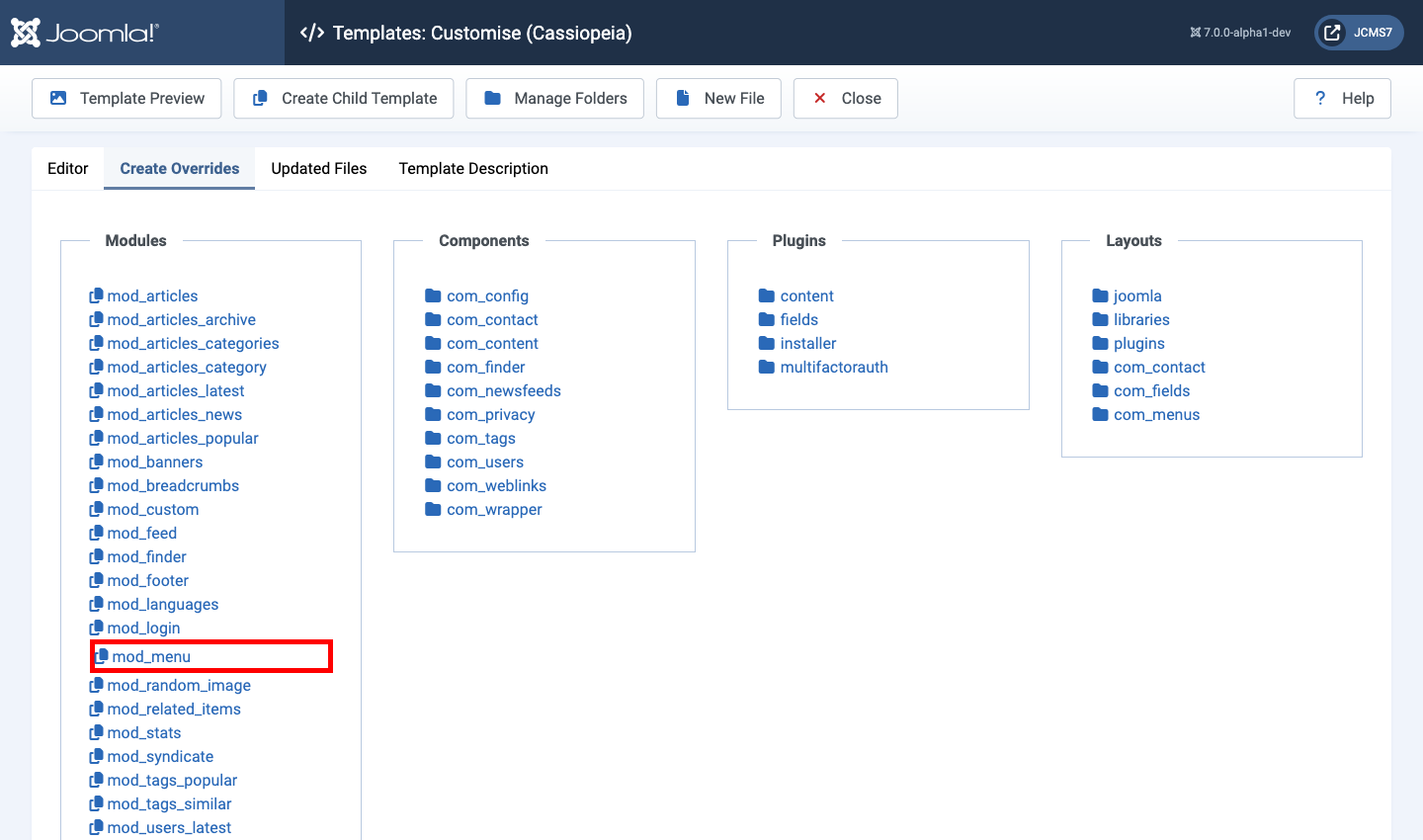
This will copy all of the menu layout files from the menu module into the override. It then return to the Editor tab.
-
In the Editor tab, expand the entries under HTML → mod_menu. Here you will find the
default.phpfile. Open the file and copy its contents to somewhere safe. Close the file. -
Create a new file in the html → mod_menu folder. It must have a name that does not include an underscore. In this example the new file is named
treedefault.php. This allows you to select either the default menu layout or this alternative menu layout in any of your menu modules. In the following list of override files the original is outlined in red and the new alternative is outlined in green.
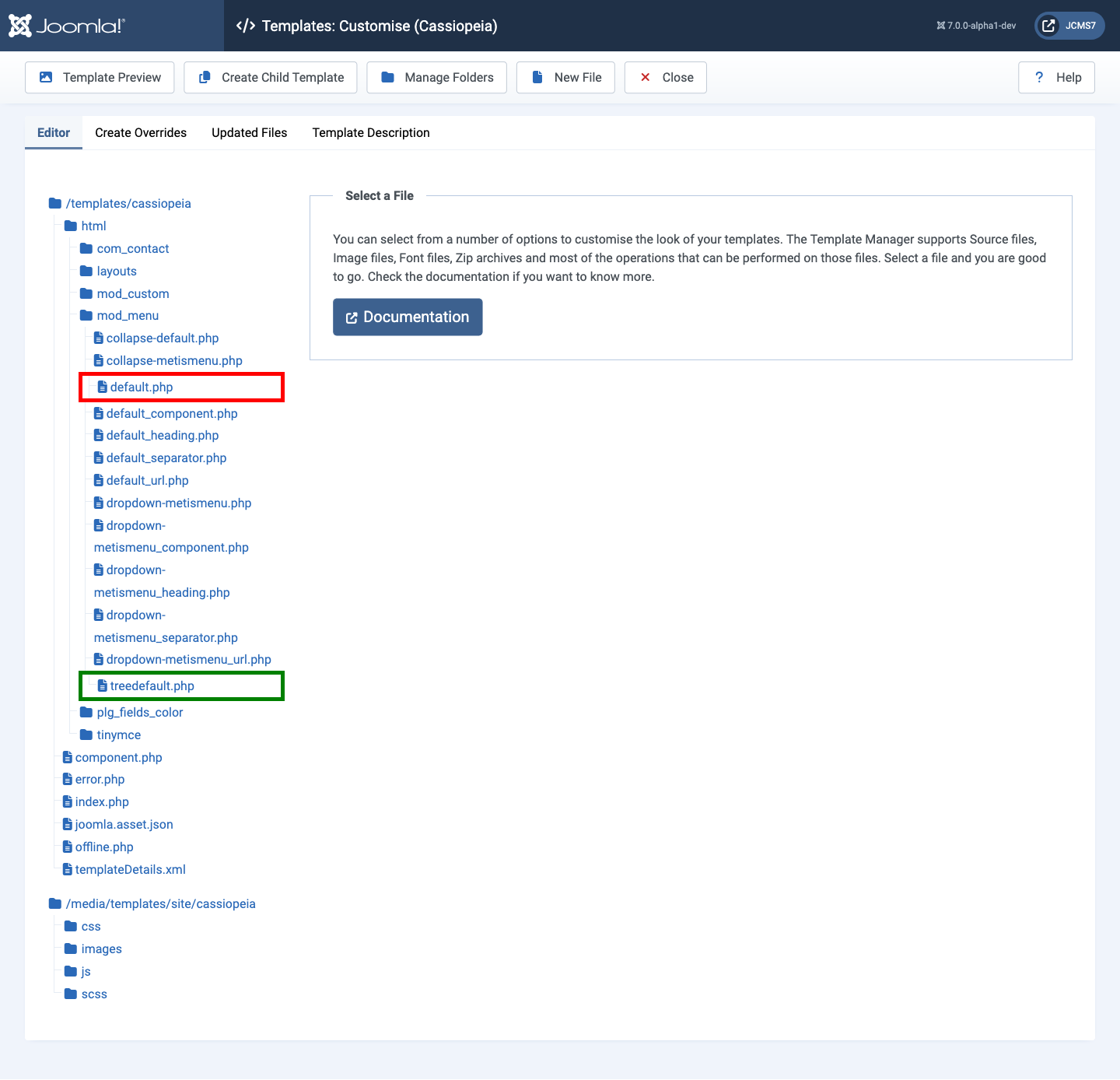
- Edit the new layout file. The following steps are list in reverse order to preserve line numbers during the edit process:
Change line 104 so that it contains the following:
echo '<ul class="list-unstyled ps-3" aria-hidden="false">';
This keeps the menu open and adds indentation to submenus.
Replace lines 98 - 101 with break
                    echo '<button class="mod-menu__toggle-sub" aria-expanded="false">' .
                 break;
                    '<span class="icon-chevron-down" aria-hidden="true"></span>' .
                    '<span class="visually-hidden">' . Text::sprintf('MOD_MENU_TOGGLE_SUBMENU_LABEL', $item->title) . '</span>' .
                    '</button>';
Remove lines 93 - 94
                    echo '<span class="icon-chevron-down" aria-hidden="true">' .
                        '</span></button>';
Remove lines 66-71
    // The next item is deeper - add toggle only here it is a heading or separator
    if ($item->deeper && (int) $item->level === $startLevel && in_array($item->type, ['separator', 'heading'])) {
        // Add a toggle button.
        echo '<button class="mod-menu__toggle-sub" aria-expanded="false">';
    }
Remove lines 15 - 20
/** @var Joomla\CMS\WebAsset\WebAssetManager $wa */
$wa = $app->getDocument()->getWebAssetManager();
$wa->getRegistry()->addExtensionRegistryFile('mod_menu');
$wa->usePreset('mod_menu.menu');
This is the complete treedefault.php override file:
<?php

/**
 * @package     Joomla.Site
 * @subpackage  mod_menu
 *
 * @copyright   (C) 2009 Open Source Matters, Inc. <https://www.joomla.org>
 * @license     GNU General Public License version 2 or later; see LICENSE.txt
 */

defined('_JEXEC') or die;

use Joomla\CMS\Helper\ModuleHelper;
use Joomla\CMS\Language\Text;


$tagId      = $params->get('tag_id', '') ?: 'mod-menu' . $module->id;
$id         = ' id="' . htmlspecialchars($tagId, ENT_QUOTES, 'UTF-8') . '"';
$startLevel = (int) $params->get('startLevel', 1);

// The menu class is deprecated. Use mod-menu instead
?>
<ul<?php echo $id; ?> class="mod-menu mod-list nav <?php echo $class_sfx; ?>">
<?php foreach ($list as $i => &$item) {
    $itemParams = $item->getParams();
    $class      = 'nav-item item-' . $item->id;

    if ($item->id == $default_id) {
        $class .= ' default';
    }

    if ($item->id == $active_id || ($item->type === 'alias' && $itemParams->get('aliasoptions') == $active_id)) {
        $class .= ' current';
    }

    if (in_array($item->id, $path)) {
        $class .= ' active';
    } elseif ($item->type === 'alias') {
        $aliasToId = $itemParams->get('aliasoptions');

        if (count($path) > 0 && $aliasToId == $path[count($path) - 1]) {
            $class .= ' active';
        } elseif (in_array($aliasToId, $path)) {
            $class .= ' alias-parent-active';
        }
    }

    if ($item->type === 'separator') {
        $class .= ' divider';
    }

    if ($item->deeper) {
        $class .= ' deeper';
    }

    if ($item->parent) {
        $class .= ' parent';
    }

    echo '<li class="' . $class . '">';

    switch ($item->type) :
        case 'separator':
        case 'component':
        case 'heading':
            require ModuleHelper::getLayoutPath('mod_menu', 'default_' . $item->type);
            break;
        default:
            require ModuleHelper::getLayoutPath('mod_menu', 'default_url');
            break;
    endswitch;

    // The next item is deeper.
    if ($item->deeper) {
        // Check type - add only on first level
        // @todo aria-label - set in menu item ???
        if ((int) $item->level === $startLevel) {
            switch ($item->type) {
                case 'heading':
                case 'separator':
                    break;

                default:
                    break;
            }
        }
        echo '<ul class="list-unstyled ps-3" aria-hidden="false">';
    } elseif ($item->shallower) {
        // The next item is shallower.
        echo '</li>';
        echo str_repeat('</ul></li>', $item->level_diff);
    } else {
        // The next item is on the same level.
        echo '</li>';
    }
}
?></ul>
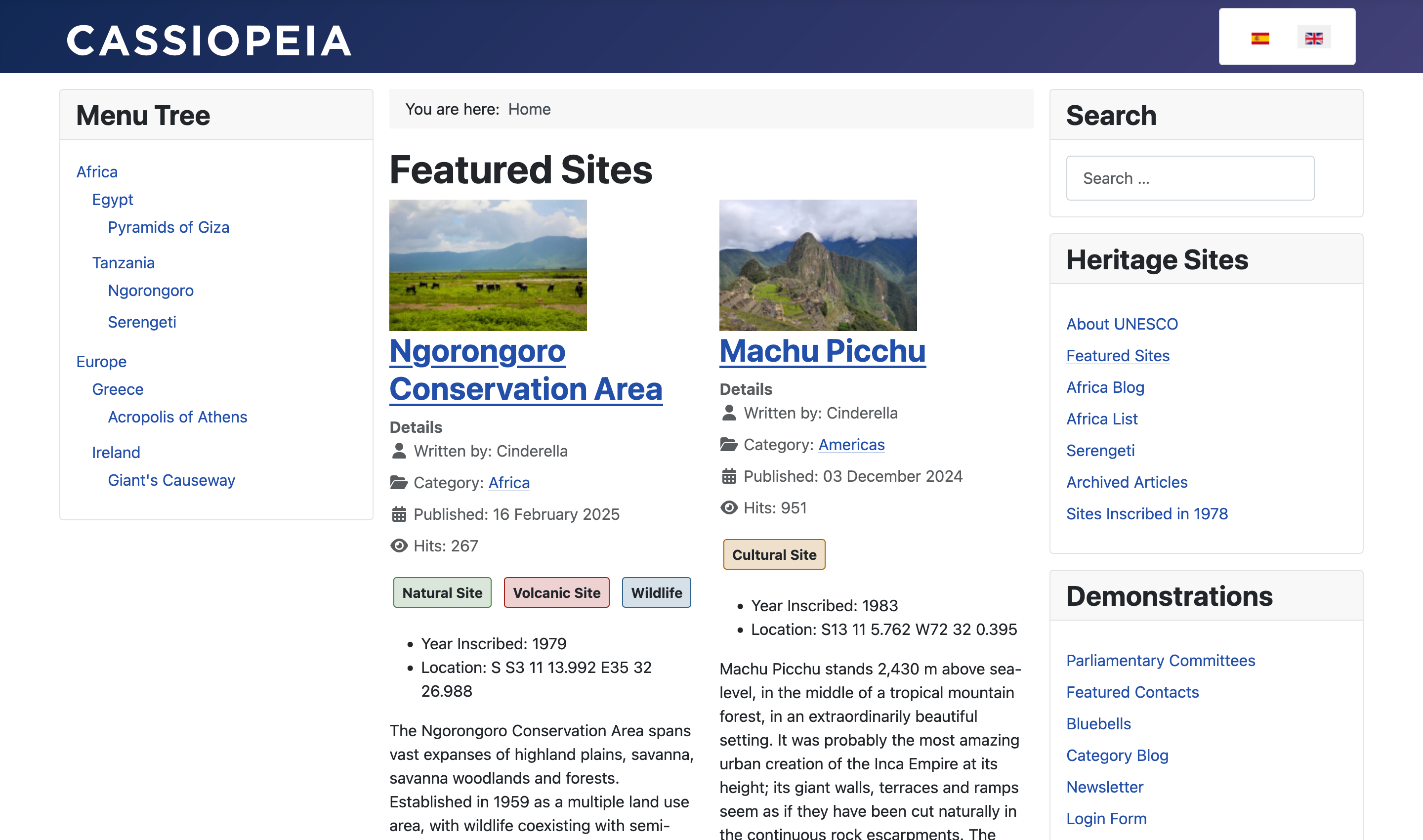
Result
The result is a plain list, without toggle functionality for the side menu module, here illustrated at the left: