Jdocmanual
Install Jdocmanual
The Jdocmanual component extension for Joomla is available from GitHub as a ZIP file. Go to the Repository and select the green Code button and then the Download ZIP item. Save the download somewhere handy.
There are separate Smart Search and a CLI plugins to download and install too.
Installation
Install the extensions as you would any other third party extension using the Upload Package File tab of the Extensions: Install page. On completion in a few seconds a Jdocmanual menu item will be available in the Components section of the Administrator menu. Expand it and Select the Manuals item. At this stage there are no manuals installed.
Configuration
Select the Options button in the Toolbar to go to the configuration page:
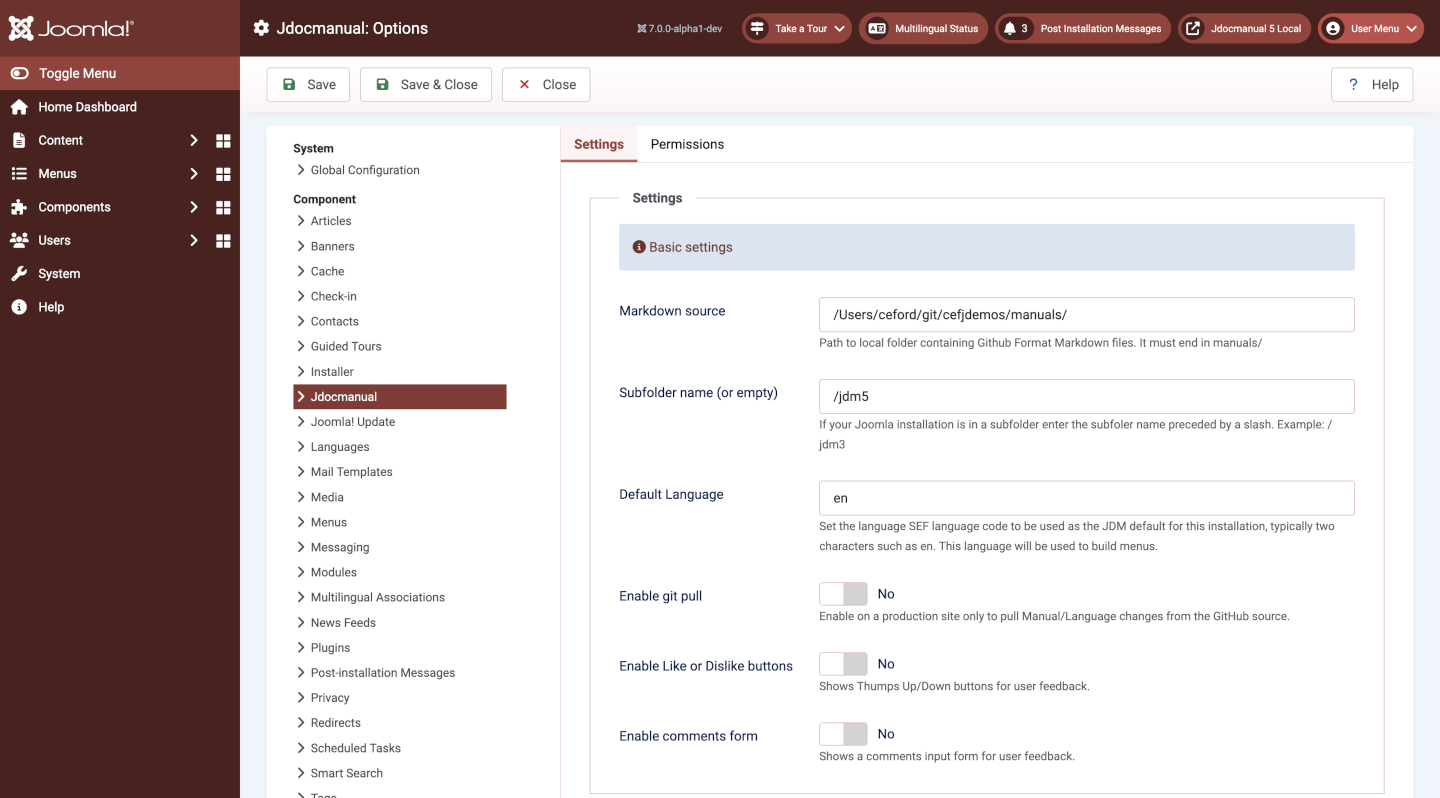
Settings
- Markdown source: The location in your file system where you created a folder to store your data repositories.
- Subfolder name (or empty): Set this if you are running Joomla in a subfolder of your site.
- Default language: This is the language used to create the default menu structure for all languages.
- Enable git pull: This is set to Yes if your site should pull updates from a remote source.
- Enable Like or Dislike buttons: Collect Yes/No data!
- Enable comments form: Collect freeform comments.
Smart Search
The Smart Search plugin needs to be enabled!
The CLI Plugin
Some build operations can be accomplished from the command line. They may be useful for building large manuals if the browser encounters time-out conditions.