Jdocmanual
Multilingual Documentation
Does anyone here speak English? This line is spoken by the character Marcus Brody (played by Denholm Elliott) in the 1989 adventure film Indiana Jones and the Last Crusade.
A silly question for an English language magazine! However, it comes up every day when English speakers venture abroad and find themselves in town centres where all of the signs are in a strange script and none of the residents understand English. So I ask you to imagine yourself as a Joomla user who does not speak or understand a word of English. The multilingual interface is great but the documentation is not much help. So for some time it has been my ambition to provide documentation in all of the languages that Joomla supports and perhaps some more.
From my point of view there are three parts to this ambition:
- Multilingual Demonstration Data.
- Multilingual Screenshots.
- Multilingual Delivery.
So let's get started ...
Multilingual Demonstration Data
In the July 2026 edition of the Magazine my article on Removable Sample Data used data based on Scottish Battlefields. Since then I have moved on to use a dataset based on UNESCO World Heritage Sites in a structure that allows unlimited translations. This is what it looks like in English:
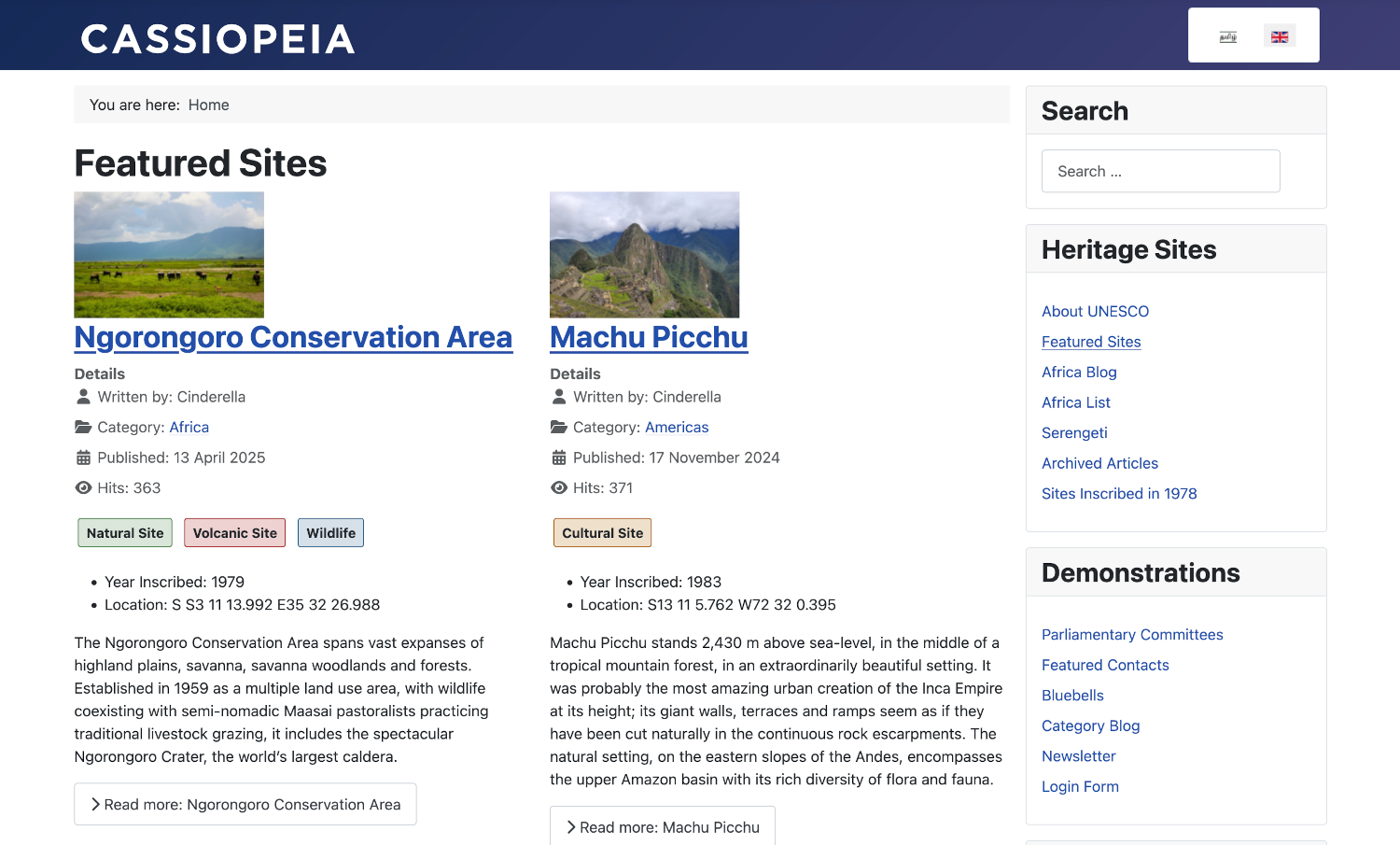
The procedure to create translations is a little complicated! I maintain an en-gb.ini file that contains all of the translatable items used in the Demonstration Data plugin. Here is a brief example:
ARTICLES_ABOUT_UNESCO_SITES_IMAGE_INTRO_ALT="Elephants and zebras"
ARTICLES_ABOUT_UNESCO_SITES_METADESC="A brief introduction to the UNESCO World Heritage Sites."
ARTICLES_ABOUT_UNESCO_SITES_TITLE="About UNESCO Sites"
ARTICLES_ACROPOLIS_OF_ATHENS_IMAGE_INTRO_ALT="Ruins originally built on a commanding flat hilltop"
ARTICLES_ACROPOLIS_OF_ATHENS_METADESC="An outline of universal symbols of the classical spirit and civilization."
ARTICLES_ACROPOLIS_OF_ATHENS_TITLE="Acropolis of Athens"
ARTICLES_BLUEBELL_POETRY_METADESC="A poem about bluebells by John Clare (1793-1864)."
ARTICLES_BLUEBELL_POETRY_TITLE="Bluebell Poetry"
ARTICLES_BLUEBELLS_IMAGES_IMAGE_INTRO_ALT="A woodland scene with carpets of bluebells"
ARTICLES_BLUEBELLS_METADESC="A brief description of the appearance, distribution and social role of bluebell flowers."
ARTICLES_BLUEBELLS_TITLE="Bluebells"
ARTICLES_COMMITTEE_AGENDA_METADESC="Agenda for the AGM."
ARTICLES_COMMITTEE_AGENDA_TITLE="Committee Agenda"
ARTICLES_COMMITTEE_MINUTES_METADESC="Minutes of the AGM."
ARTICLES_COMMITTEE_MINUTES_TITLE="Committee Minutes"
I also maintain source templates where those key-value pairs are used. Again a brief example of an entry from a json file containing translatable keys:
{
    "state":1,
    "title":"ARTICLES_ABOUT_UNESCO_SITES_TITLE",
    "alias":"about-unesco-sites-aa-bb",
    "category_alias":"about-unesco-aa-bb",
    "language":"aa-BB",
    "text_source":"about-unesco-sites.html",
    "hits":"135",
    "metadesc":"ARTICLES_ABOUT_UNESCO_SITES_METADESC",
    "images": {
        "image_intro":"images\/demodata\/heritage\/serengeti-200.jpg#joomlaImage:\/\/local-images\/demodata\/heritage\/serengeti-200.jpg?width=200&height=133",
        "image_intro_alt":"ARTICLES_ABOUT_UNESCO_SITES_IMAGE_INTRO_ALT",
        "float_intro":"FIELDS_RADIO_LIFE_CYCLE_FIELDPARAMS_OPTIONS0_VALUE",
        "image_intro_caption":"FIELDS_RADIO_LIFE_CYCLE_FIELDPARAMS_OPTIONS0_VALUE",
        "image_fulltext":"images\/demodata\/heritage\/serengeti-400.jpg#joomlaImage:\/\/local-images\/demodata\/heritage\/serengeti-400.jpg?width=400&height=267",
        "image_fulltext_alt":"ARTICLES_ABOUT_UNESCO_SITES_IMAGE_INTRO_ALT",
        "float_fulltext":"float-end ms-3",
        "image_fulltext_caption":"FIELDS_RADIO_LIFE_CYCLE_FIELDPARAMS_OPTIONS0_VALUE"
    }
}
Article text is stored separately in html files. Two short PHP scripts are required. The first uses Openai to obtain translations of the en-gb.ini file and each of the html article files. The second processes the source templates to output the translated data used in the demonstration data plugin.
It takes just a few minutes to generate the demonstration data in a new language. However, for the moment I have used only 12 languages as I first needed to integrate the data sets with tutorials and their screenshots. Here is another example screenshot in Tamil:
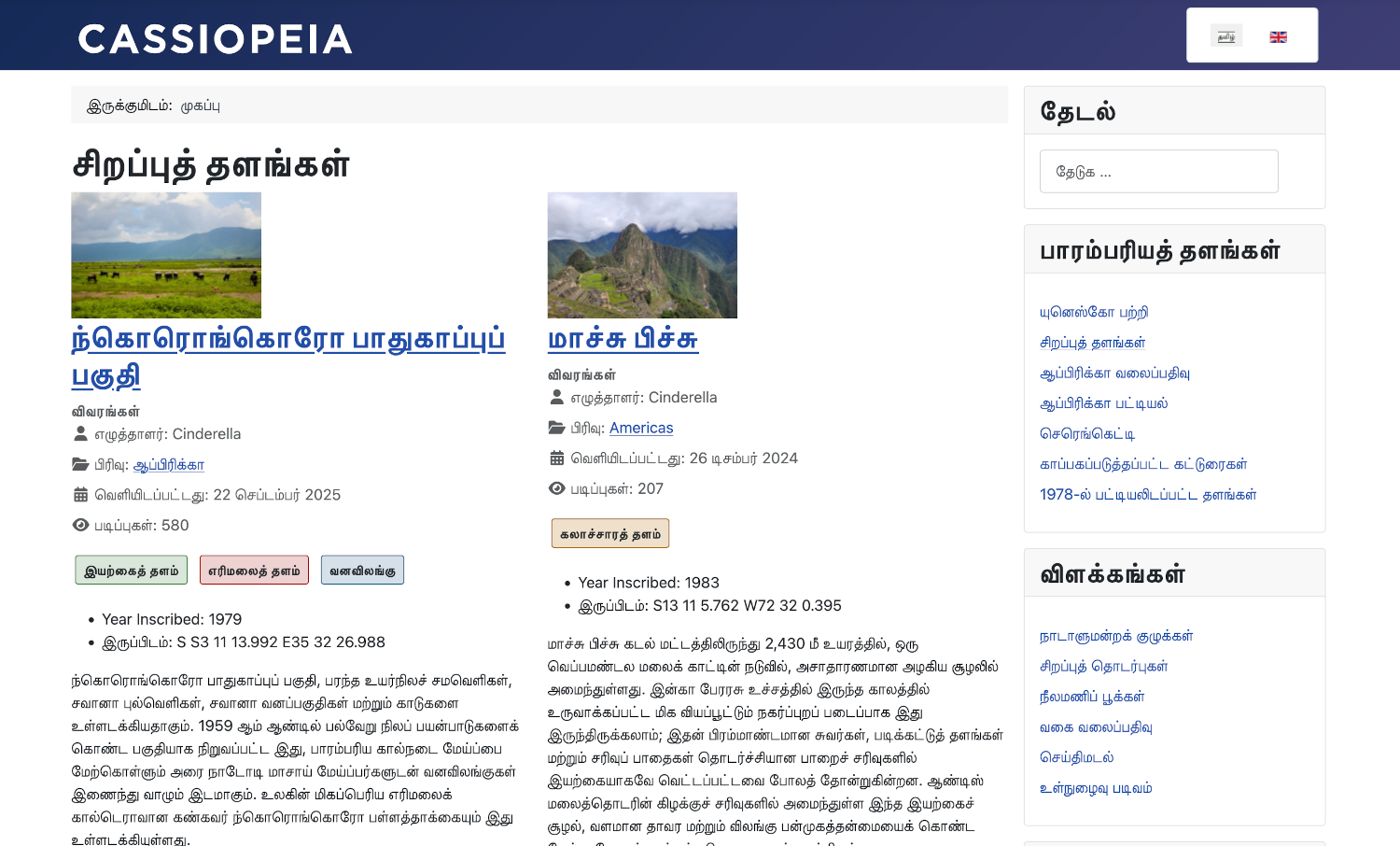
Data for several languages may be installed simultaneously and there is no limit to the number of times the data can be removed and reinstalled. Installation takes just a few seconds.
There is a demonstration of the use of the Heritage demonstration data in an item in the new Joomla Playground.
Multilingual Screenshots
Screenshots help to make it clear what exactly is being described in a help page or a tutorial. They are typically in English and sometimes annotated with coloured arrows, outlines or text. Good enough for English readers but otherwise not much help. It is easy to use screenshots in the language of the tutorial but not so easy to capture them. There are about 470 images in our Help pages and about 520 images in our User pages in English alone.
I use Playwright to automate screenshot capture. This is a screenshot of VSCode showing a single test:
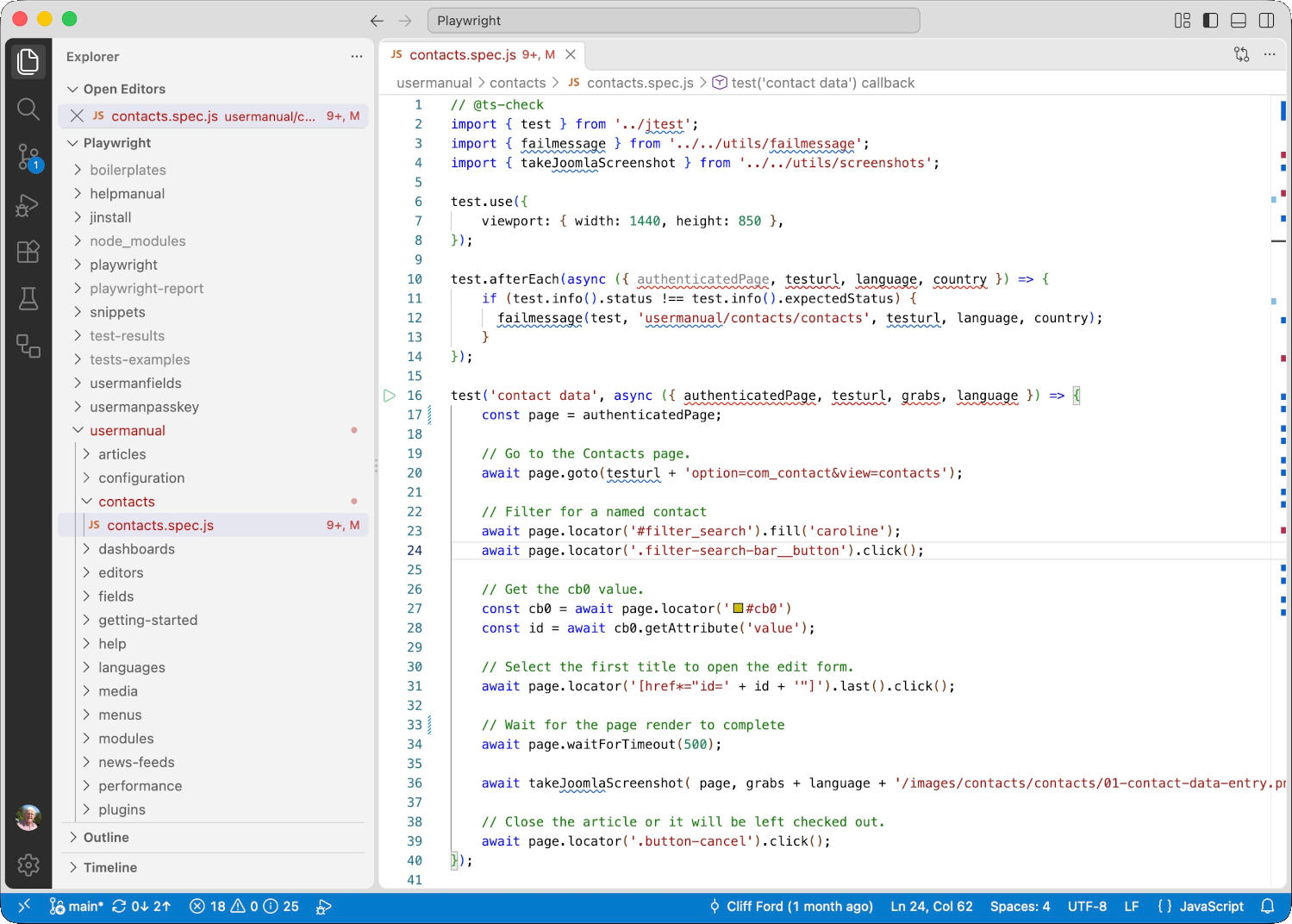
For the Help and User documentation there are over 100 tests with each producing one or more screenshots. It is easy to apply a red border to screen elements but not freehand arrows, outlines or text.
For production the tests are run from the command line, for example:
URL=https://localhost/jcms7gd/ LANGUAGE=ta COUNTRY=ta-IN \
npx playwright test usermanual --project firefox --reporter dot

Running 148 tests using 9 workers
...
  21 failed
    [firefox] › usermanual/articles/articles-edit.spec.js:442:5 › articles edit pagination ─────────
    [firefox] › usermanual/articles/articles-edit.spec.js:764:5 › articles delete
    ...
    ────────────────
    [firefox] › usermanual/workflows/workflows.spec.js:97:5 › workflows transitions ────────────────
    [firefox] › usermanual/workflows/workflows.spec.js:157:5 › workflows categories ────────────────
  127 passed (2.8m)
The tests run in parallel so sometimes interfere with each other and cause failures. I run the failed tests individually and most then pass. Persistent fails usually indicate something wrong with the test setup that I need to fix.
The output is screenshots placed exactly where needed in the translated documentation. In fact, the screenshots can be obtained before the translations are ready.
This automated approach allows screenshots to be replaced relatively quickly. For example, should Joomla 7 appear with new frontend and backend templates I can regenerate the screenshots with those new templates in an hour or so per language.
Screenshots in the appropriate document language have recently appeared in the Guide. You can see them in the Introduction to Joomla page. This link shows the English page with the old screenshots. Select each language in turn to see the screenshots in the same language as the text using the new demonstration data.
Multilingual Delivery
Content delivery carries some logistic problems. The Help and User tutorial images in English use about 400Mb of disk space. The responsive images generated for production for the 9 languages currently used in Jdocmanual occupy 4.4G of disk space. Multiply that by 5 or more for all of the languages supported by Joomla!
Jdocmanual handles all of this adequately and was the proving ground for integration of multilingual text and images. However, it will not be used for delivery. I expect the images and text in multiple languages may be imported from Jdocmanual into the Guide where new translation methods with human translator feedback will be used.
There are some unsolved problems! The now deprecated Wiki documentation had provision to use Help screens tied to each Joomla version. Although that worked well enough, it required the translation process to start again. By the time Joomla 6 came along we decided to abandon that and simply aliased Joomla 6 Help pages to Joomla 5 Help pages. And translation was haphazard, with many documents having only headings or one or two paragraphs translated. Hence the advent of automated translation by AI.
It is possible to generate static HTML pages for the Help pages for each major version of Joomla! However, I doubt there will be any attempt to maintain anything other than the pages for the current release. The same is not so obvious for User tutorial pages!
Just where to go from here is up to the Documentation Team!
Conclusion
If you would like to see multilingual documentation in action you can do so in two places:
- Go to the Jdocmanual Introduction to Joomla page and select each available language in turn using the Page Language selector at the top right of the page. Notice that the screenshots are in the same language as the text and the English version uses the Heritage dataset.
- Go to the same page in the Guide and try it there too.
Note that Persian Farsi is a right-to-left language!